Compress Image is a convenient online image processing tool that allows you...
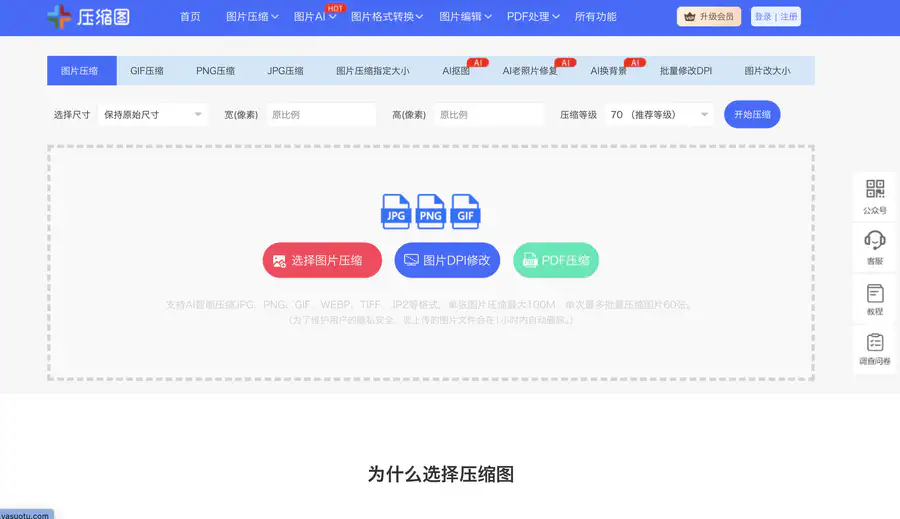
Compress Image is a convenient online image processing tool that allows you to complete various image editing operations without downloading software. Core features include image compression, supporting single and batch compression of formats such as JPG, PNG, GIF, with flexible compression level adjustment to reduce file size; it also provides image format conversion, image resizing and cropping, AI background removal, old photo colorization, lossless image enlargement, ID photo processing, and more. It is suitable for various scenarios such as exam registration photos, e-commerce product images, social sharing photos, etc. Batch image processing can be done online, meeting the daily image processing needs of office work, design, and social media. #yasuotu.com
- OOOAIOOOAI is a platform that aggregates AI models such as GPT, Claude, and Gemini. It provides direct access in China, works as soon as you open it, and new users can register to enjoy a limited-time free trial of the world's top models. It seamlessly connects to the native official services of ChatGPT, Claude, and Gemini, supports AI chat, intelligent Q&A, copywriting, coding, long-text summarization, and translation polishing. You can freely switch between different models and compare responses, eliminating the hassle of repeatedly switching tools. It is a one-stop direct gateway to leading overseas large models for users worldwide. #oooai #GPT
- open-web Website Traffic Analyticsopen-web is a professional and easy-to-use third-party website traffic analytics platform. Powered by real-time data dashboards, it analyzes crawler activity, tracks user behavior, and provides detailed traffic source analysis to empower SEO and improve site rankings.
- ZhimanjuZhimanju is a well-known AI-powered comic drama creation platform that enables one-stop generation from script to finished episode, helping creators produce viral comic drama content with a single click. The platform features core functions such as AI scriptwriting, comic drama asset management, and work records, while the desktop version unlocks advanced capabilities like infinite canvas, production workbench, and batch creation, fully covering the entire comic drama production pipeline. Whether individual creators or content teams, they can leverage AI comic drama production to dramatically lower the creative barrier, quickly turn ideas into complete comic drama works, and efficiently achieve mass output. As a mature online AI comic drama creation tool, Zhimanju supports diverse content creation including comic-to-drama and novel-to-drama adaptations. With AI-driven technological advantages, it has become a top choice for comic drama creators seeking to boost production efficiency.#jiaxunai
- Qiewen AcademicQiewen Academic is a professional AI research literature assistant. With intelligent search and deep retrieval capabilities, it helps you precisely locate every needed paper among massive global academic publications. The platform brings together top journals and preprints such as Nature and bioRxiv, and offers three retrieval modes: AI deep search, intelligent Agent, and inspiration discovery. It supports literature library management, project collaboration, TrueCite citation verification, and personalized trend push notifications. Whether you are searching for academic papers, tracking research frontiers, writing literature reviews, or deeply reading classic papers, Qiewen Academic helps you efficiently complete literature retrieval and academic discovery, freeing researchers from inefficient paper searches and literature lookups. It is an indispensable intelligent literature management and research assistant for academic research. #qiewenpaper
- Putian Streetwear Shoes & Apparel - SupplySix-year-old shop, first-hand supply, specializing in shoes from major streetwear brands: Nike, Adidas, Converse, Puma, Salomon, Arc'teryx, Descente, etc. Focused on mid-to-high-end quality. Also offers streetwear apparel, Apple earphones, Casio, bags, and other hot-selling items. #xie.yixuev


Details
1. Basic Website Information
Website Name: Yasuotu (Compress Image)
Website URL: https://www.yasuotu.com
Developer/Operator: Not publicly disclosed
Launch Date: Domain registered in 2016; has been in continuous operation since, with the site claiming "6 years of stable operation".
Languages Supported: Chinese
Accessibility: Globally accessible; in mainland China, it can be opened directly without a VPN.
This is an online image processing toolkit. Without downloading any software, you can open the webpage to compress images, resize, convert formats, and make ID photos. Its core purpose is to make your images smaller, compliant, and easier to use.
2. Pricing Model
Basic Functions: Over 60 features – including image compression, format conversion, resizing, ID photo creation, and AI background removal – are currently all free to use. For daily processing of a few images, making a registration photo, or converting formats, there is no charge.
Batch Processing: You can upload up to 60 images per batch, with a maximum single‑file size of 100 MB. Batch compression is also free.
Membership/Paid Plans: The official website does not have a membership system, and no API service entry was found.
Reminder: The operating strategy of free tools may change. For the latest pricing policies, it is advisable to visit https://www.yasuotu.com directly.
3. Core Features
🗜️ Smart Image Compression
Function: Upload images in formats such as JPG, PNG, GIF, WEBP, TIFF, and JP2, and the AI algorithm automatically compresses them.
Benefit: File size can be reduced by 60%‑90%, with virtually imperceptible quality loss. When emailing, sharing on WeChat, or uploading to registration systems, you no longer get "file too large" errors.
📐 Compress to a Specified Size
Function: Enter a target file size (e.g., 50 KB, 200 KB, 1 MB), and the system automatically compresses the image to meet that limit.
Benefit: For postgraduate entrance exams, CET‑4/6 photos, teacher certification, or accounting exams – whatever size the system requires, you can compress it to that exact size without trial and error.
📷 One‑Stop ID Photo Processing
Function: Built‑in standard sizes like one‑inch, two‑inch, small one‑inch, and small two‑inch; supports background colour change, background removal, and DPI adjustment.
Benefit: No need to go to a photo studio – just take a photo with your phone, upload it, and the tool automatically crops it to a standard ID photo, changes the background to white/blue/red, and you can download it ready to use.
🤖 AI Background Removal
Function: Upload an image, and the AI automatically identifies the subject (e.g., a person) and removes the background with one click.
Benefit: For e‑commerce white‑background product images, PPT materials, or changing ID photo backgrounds, you don't need Photoshop – the output is ready in 3 seconds.
4. Typical Use Scenarios
Postgraduate/Civil service exam candidates → The registration system requires a photo no larger than 200 KB. Open Yasuotu, select "Compress to specified size", enter 200 KB, upload your ID photo – the system automatically compresses it to exactly the required size, and you can upload it successfully.
E‑commerce operators → Product images are too large. Upload up to 60 product photos in one batch, compress them uniformly, and the total size is halved – page load speed improves, and bounce rates decrease.
Designers → You need to send a client presentation (PPT) with dozens of high‑resolution images, but the file is too large to send via WeChat. Drag the images into Yasuotu for batch processing – the PPT size drops from 50 MB to 5 MB, and you can send it instantly.
5. How to Get Started
Open the website: Visit https://www.yasuotu.com – no download required; just open it in your browser.
Choose a function: Select the tool you need from the top menu – "Image Compression", "ID Photo", "AI Cutout", etc. No registration is needed – upload your image directly.
Adjust parameters and save: Set the compression level or target size, click "Start Compression", and after processing, click "Save Image" to download it locally. Batch processing supports downloading as a ZIP package.
6. Comparison with Similar Platforms – Pros and Cons
Unique Advantages
Wide format support: Supports JPG, PNG, GIF, WEBP, TIFF, and JP2 – many free tools only support the first three.
High integration: Compression, format conversion, resizing, background removal, ID photos, PDF processing, and lossless enlargement – one site replaces five or six separate tools, so you don't have to switch back and forth.
Generous batch processing: Up to 60 images per batch, 100 MB per file – this is quite generous among free online tools.
Practical Highlights
The "compress to specified size" feature is particularly useful for examination registrations and platform upload limits.
Offers advanced functions like AI old photo restoration and lossless image enlargement, going beyond typical compression tools.
Objective Shortcomings
Outdated interface: Compared with sleek tools like Squoosh and TinyPNG, the webpage design is plain, and the interactive experience is not particularly refined.
Limited depth in advanced features: AI cutout edge handling, fine adjustment of ID photo face position, etc., are not as precise as professional software (e.g., Photoshop, Meitu Xiuxiu Pro).
Comparison Dimension | Yasuotu | TinyPNG | Squoosh |
|---|---|---|---|
Core Positioning | Comprehensive image processing toolkit | Focused on PNG/JPG compression | Google open‑source compression tool |
Feature Scope | Compression + format conversion + ID photos + cutout + PDF | Compression only | Compression + format conversion only |
Batch Processing | 60 images/batch, 100 MB/image | 20 images/batch | Single image |
Pricing | Currently free | Free (with limits) | Free |
Local Processing | Some functions support | Requires server upload | Supports local processing |
Best Suited For | Users who need one‑stop handling of various image tasks | Users who only need quick PNG/JPG compression | Developers/tech enthusiasts |
7. Frequently Asked Questions
Q1: Is it safe to upload my images? Will they be saved?
A: The official site states that two privacy measures are used – some functions employ WebAssembly local processing, meaning images are processed only in your browser's memory and are not uploaded to the server; for other functions, images are automatically deleted within 1 hour after upload. However, for images containing ID cards or sensitive personal information, it is recommended to prioritise the features marked as "local processing".
Q2: Will compressed images lose quality?
A: It depends on the compression level you select. Higher levels preserve more detail, while lower levels produce smaller files. The default level 70 provides a good balance between file size and quality. If you have high quality requirements, you can choose a higher level or preview the result before downloading.
Q3: Can I compress animated GIFs (like WeChat stickers)?
A: Yes. GIF compression is supported, with a dedicated entry for WeChat sticker compression that can reduce the size to meet WeChat's dimension and file size limits.
Q4: What is the difference between Yasuotu and TinyPNG?
A: TinyPNG only compresses PNG and JPG, has a clean interface, and allows up to 20 images per batch. Yasuotu supports more formats, offers more features, and has larger batch capacity, plus it can create ID photos, remove backgrounds, and convert formats. If you only need to quickly compress a few PNGs, TinyPNG is sufficient; if you need to handle multiple types of tasks, Yasuotu is more convenient.
Q5: Do I need to register an account?
A: No. You can upload images directly without registration or login. Some functions (e.g., saving history) may require an account, but core compression features are fully open.
Q6: Can I use it on mobile?
A: Yes. Open https://www.yasuotu.com in your mobile browser – no app installation required. However, the smaller screen makes batch processing less convenient than on a computer.
Based on 0 ratings
- 5 stars, 0%, 0 ratings
- 4 stars, 0%, 0 ratings
- 3 stars, 0%, 0 ratings
- 2 stars, 0%, 0 ratings
- 1 stars, 0%, 0 ratings
Rate Compress Image?
Tap a star to rate