Magic Eraser is a free image editing tool that can remove watermarks, unwan...
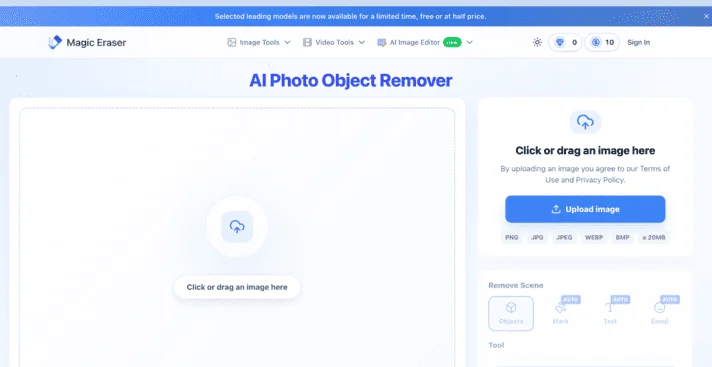
Magic Eraser is a free image editing tool that can remove watermarks, unwanted objects, and text from images with one click using AI. It supports removing passersby, logos, text from memes, stickers, and more, using AI intelligent inpainting technology for lossless editing. Compatible with mainstream formats like JPG, PNG, and WebP, and requires no login to use. It is widely used for product photo editing, social media image retouching, photo restoration, and blemish removal, making it a high-quality online watermark removal tool for global users. #magiceraser
- OOOAIOOOAI is a platform that aggregates AI models such as GPT, Claude, and Gemini. It provides direct access in China, works as soon as you open it, and new users can register to enjoy a limited-time free trial of the world's top models. It seamlessly connects to the native official services of ChatGPT, Claude, and Gemini, supports AI chat, intelligent Q&A, copywriting, coding, long-text summarization, and translation polishing. You can freely switch between different models and compare responses, eliminating the hassle of repeatedly switching tools. It is a one-stop direct gateway to leading overseas large models for users worldwide. #oooai #GPT
- open-web Website Traffic Analyticsopen-web is a professional and easy-to-use third-party website traffic analytics platform. Powered by real-time data dashboards, it analyzes crawler activity, tracks user behavior, and provides detailed traffic source analysis to empower SEO and improve site rankings.
- ZhimanjuZhimanju is a well-known AI-powered comic drama creation platform that enables one-stop generation from script to finished episode, helping creators produce viral comic drama content with a single click. The platform features core functions such as AI scriptwriting, comic drama asset management, and work records, while the desktop version unlocks advanced capabilities like infinite canvas, production workbench, and batch creation, fully covering the entire comic drama production pipeline. Whether individual creators or content teams, they can leverage AI comic drama production to dramatically lower the creative barrier, quickly turn ideas into complete comic drama works, and efficiently achieve mass output. As a mature online AI comic drama creation tool, Zhimanju supports diverse content creation including comic-to-drama and novel-to-drama adaptations. With AI-driven technological advantages, it has become a top choice for comic drama creators seeking to boost production efficiency.#jiaxunai
- Qiewen AcademicQiewen Academic is a professional AI research literature assistant. With intelligent search and deep retrieval capabilities, it helps you precisely locate every needed paper among massive global academic publications. The platform brings together top journals and preprints such as Nature and bioRxiv, and offers three retrieval modes: AI deep search, intelligent Agent, and inspiration discovery. It supports literature library management, project collaboration, TrueCite citation verification, and personalized trend push notifications. Whether you are searching for academic papers, tracking research frontiers, writing literature reviews, or deeply reading classic papers, Qiewen Academic helps you efficiently complete literature retrieval and academic discovery, freeing researchers from inefficient paper searches and literature lookups. It is an indispensable intelligent literature management and research assistant for academic research. #qiewenpaper
- Putian Streetwear Shoes & Apparel - SupplySix-year-old shop, first-hand supply, specializing in shoes from major streetwear brands: Nike, Adidas, Converse, Puma, Salomon, Arc'teryx, Descente, etc. Focused on mid-to-high-end quality. Also offers streetwear apparel, Apple earphones, Casio, bags, and other hot-selling items. #xie.yixuev


Details
1. Basic Website Information
Website Name: Magic Eraser
Website URL: https://magiceraser.org
Developer/Operator: Magic Studio (a product line within the studio)
Launch Date: Launched around 2024, continuously and actively updated
Network Access: Globally accessible; directly accessible from mainland China
Magic Eraser is an online AI image erasing tool that helps you remove unwanted people, watermarks, text, and clutter from photos in one click. No need for Photoshop – just open the webpage, brush over the unwanted areas, and you’re done.
2. Pricing Model
Basic features are free. Uploading images, brushing, previewing results are all free to try on the web version, and no registration or login is required.
The free plan has limits. Typically about 10 free processing credits per month, with a per‑image limit of 5MB / 2000×2000 pixels; exported results may carry a watermark or advertisement.
Premium unlocks more features. Paid plans follow the Magic Studio pricing structure: weekly subscription ~$4.99/week, annual subscription ~$29.99/year (significantly cheaper than weekly). Premium unlocks unlimited credits, high‑resolution exports, watermark‑free output, and higher‑resolution processing.
⚠️ Specific prices are subject to change. For detailed pricing, please refer to the official real‑time page: https://magiceraser.org
3. Core Features
AI‑Powered Object Removal
Upload a photo, paint over the elements you want to delete, and the AI automatically analyses the surrounding textures and fills in the background. Remove photo‑bombers from travel shots, logos from product images, or text from memes – results appear in seconds.
One‑Click Background Removal
Not just local erasing – you can also cut out an entire person or object from its background. For e‑commerce product images, ID photo background changes, or social media avatars, you don’t need to learn complicated masking techniques.
Video Watermark Removal
Beyond images, it also supports removing watermarks from videos. Have a downloaded clip that carries a platform logo? Upload the video snippet and let the AI clean up the distracting elements.
Batch Processing Saves Time
Upload multiple images at once, mark each one, and batch‑erase in one go. E‑commerce sellers dealing with a large set of SKU photos, or photographers cleaning up power lines from a batch of shots, can save significant time with this feature.
4. Typical Use Cases
Travel enthusiasts → Selfies at tourist spots always have strangers in the background – erase them and the AI fills the scene naturally, making your social media posts much cleaner.
E‑commerce sellers → Downloaded supplier images often come with brand watermarks – use the logo removal feature to clean them up and use the images directly as main product photos.
Content creators → When making memes or remix content, erase the original text and stickers, then add your own captions.
5. How to Get Started
Step 1: Visit https://magiceraser.org, click to upload or drag your image into the webpage.
Step 2: Use the brush tool to paint over the area you want to remove (people, watermarks, text, or any clutter). Adjust the brush size to cover the target.
Step 3: Click the "Erase" button and wait for the AI to process. Preview the result, and if satisfied, download it to your local device.
6. Pros and Cons Compared to Similar Platforms
Unique Advantages
Zero‑barrier instant use. No need to download software or learn about layers and masks – just open the webpage and start. Much lighter than Photoshop.
Natural AI background inpainting. Instead of simple blurring or pixelation, the AI "imagines" and fills in based on surrounding content – under simple backgrounds, the results are almost seamless.
Broad format support. Handles JPG, PNG, WEBP, AVIF, HEIC, and TIFF – photos from your phone or downloaded from the web can usually be uploaded directly.
Practical Highlights
No login required for the web version – perfect for quick, emergency fixes.
Available as iOS and Android apps for on‑the‑go editing.
Objective Limitations
Free plan has limited credits. About 10 per month; processing large images or exporting in high resolution requires payment – heavy users will hit the cap quickly.
Effectiveness drops on complex backgrounds. When the area has intricate textures or large coverage, AI inpainting may not look natural and may require multiple manual adjustments.
Limited fine‑editing capabilities. Compared to Photoshop, it cannot perform curve colour adjustment, strand‑level hair masking, or other professional operations – it is best for quick fixes rather than deep retouching.
7. Frequently Asked Questions (FAQ)
Q1: Are my uploaded photos saved? How is privacy protected?
A: The official website promises not to save user images – data is not retained on the server after processing, making it suitable for sensitive photos.
Q2: Is the free version really enough? Will I be charged after two erases?
A: The free version gives about 10 credits per month, which is sufficient for occasional everyday use. If you need batch background removal or export high‑resolution images without watermarks, you will need to upgrade to the paid version.
Q3: How does it differ from Photoshop or Remove.bg?
A: Magic Eraser excels in extreme simplicity and localised object removal; Remove.bg focuses specifically on background removal, while Magic Eraser also handles people, text, and logos; Photoshop is fully featured but has a steep learning curve. Choose based on your needs.
Based on 0 ratings
- 5 stars, 0%, 0 ratings
- 4 stars, 0%, 0 ratings
- 3 stars, 0%, 0 ratings
- 2 stars, 0%, 0 ratings
- 1 stars, 0%, 0 ratings
Rate Magic Eraser?
Tap a star to rate