
edclub
1.55Kedclub is a professional online touch typing practice and keyboard fingerin...
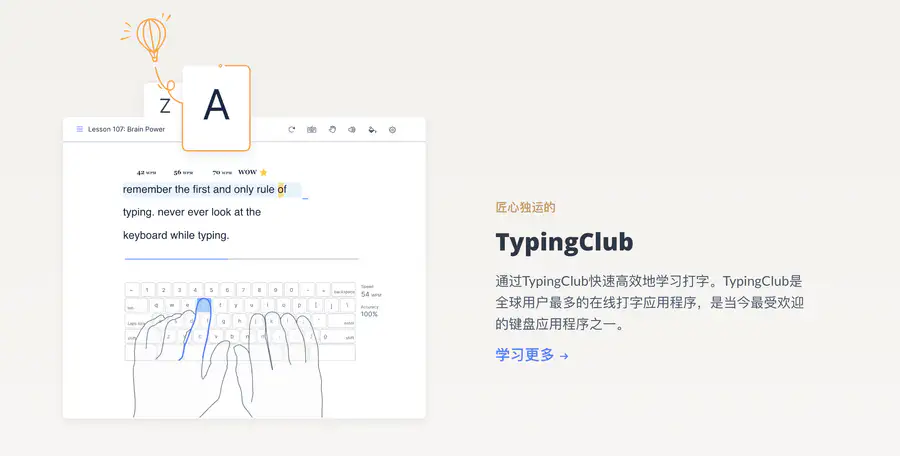
edclub is a professional online touch typing practice and keyboard fingering training platform. It also offers interactive courses in vocabulary spelling, roots and affixes, digital citizenship, social-emotional learning (SEL), and more, while covering cybersecurity education and basic office skills. Teachers can use the platform for assignment management, learning analytics, custom courses, and online quizzes, with support for Google Classroom integration and school district management. Individual learners can enjoy gamified learning, and the platform also provides accessibility features and can generate learning certificates, meeting the diverse learning needs of schools, institutions, and self-study users. #edclub, #006
- OOOAIOOOAI is a platform that aggregates AI models such as GPT, Claude, and Gemini. It provides direct access in China, works as soon as you open it, and new users can register to enjoy a limited-time free trial of the world's top models. It seamlessly connects to the native official services of ChatGPT, Claude, and Gemini, supports AI chat, intelligent Q&A, copywriting, coding, long-text summarization, and translation polishing. You can freely switch between different models and compare responses, eliminating the hassle of repeatedly switching tools. It is a one-stop direct gateway to leading overseas large models for users worldwide. #oooai #GPT
- open-web Website Traffic Analyticsopen-web is a professional and easy-to-use third-party website traffic analytics platform. Powered by real-time data dashboards, it analyzes crawler activity, tracks user behavior, and provides detailed traffic source analysis to empower SEO and improve site rankings.
- ZhimanjuZhimanju is a well-known AI-powered comic drama creation platform that enables one-stop generation from script to finished episode, helping creators produce viral comic drama content with a single click. The platform features core functions such as AI scriptwriting, comic drama asset management, and work records, while the desktop version unlocks advanced capabilities like infinite canvas, production workbench, and batch creation, fully covering the entire comic drama production pipeline. Whether individual creators or content teams, they can leverage AI comic drama production to dramatically lower the creative barrier, quickly turn ideas into complete comic drama works, and efficiently achieve mass output. As a mature online AI comic drama creation tool, Zhimanju supports diverse content creation including comic-to-drama and novel-to-drama adaptations. With AI-driven technological advantages, it has become a top choice for comic drama creators seeking to boost production efficiency.#jiaxunai
- Qiewen AcademicQiewen Academic is a professional AI research literature assistant. With intelligent search and deep retrieval capabilities, it helps you precisely locate every needed paper among massive global academic publications. The platform brings together top journals and preprints such as Nature and bioRxiv, and offers three retrieval modes: AI deep search, intelligent Agent, and inspiration discovery. It supports literature library management, project collaboration, TrueCite citation verification, and personalized trend push notifications. Whether you are searching for academic papers, tracking research frontiers, writing literature reviews, or deeply reading classic papers, Qiewen Academic helps you efficiently complete literature retrieval and academic discovery, freeing researchers from inefficient paper searches and literature lookups. It is an indispensable intelligent literature management and research assistant for academic research. #qiewenpaper
- Putian Streetwear Shoes & Apparel - SupplySix-year-old shop, first-hand supply, specializing in shoes from major streetwear brands: Nike, Adidas, Converse, Puma, Salomon, Arc'teryx, Descente, etc. Focused on mid-to-high-end quality. Also offers streetwear apparel, Apple earphones, Casio, bags, and other hot-selling items. #xie.yixuev


Details
1. Basic Website Information
Website name: EdClub (formerly TypingClub)
Website address: https://www.edclub.com
Developer/Operator: EdClub, Inc. (Rockville, Maryland, USA)
Launch date: Launched in 2011, later merged into the EdClub brand
Supported languages: Typing courses cover 30+ languages, including Chinese, Spanish, French, German, etc.
Network access: Globally accessible
This is a free online typing practice platform that teaches touch typing through gamified levels. It coaches you all the way from basic finger placement to high-speed touch typing, and also supports courses such as vocabulary spelling and digital citizenship.
2. Pricing Model
Free version: The core curriculum is free long-term for individuals and schools. Typing courses and basic progress tracking are available, at the cost of ads on pages.
School Pro version: Starts at 20 student licenses, $120/year (about $6/year per student). Unlocks unlimited classes, ad removal, typing test replay, and advanced reports.
Individual Premium: About $8.5/month, or $35/year if paid annually (prices often have promotions; subject to the official website).
API service: None
Prices may be adjusted at any time. For details, refer to the official website: https://www.edclub.com/pricing
3. Core Features
⌨️ Level-based typing courses
Starts with the 8 home keys. The main Typing Jungle course is divided into 685 small levels, each lasting a few minutes, so you can grind them even on the subway.
Virtual fingers demonstrate finger placement in real time, and wrong key presses are immediately flagged. You don't need to memorize a keyboard map; muscle memory develops on its own.
⭐ Star ratings + achievement badges
Each level awards stars based on speed and accuracy. Collect stars to unlock badges. It's like clearing a game, not doing boring homework.
📊 Data review
Records your WPM (words per minute) and accuracy, and even gives you a clear analysis of the strengths and weaknesses of each finger.
🏫 Teacher admin dashboard (school version)
Create classes, assign courses, watch student replays, and catch students who have someone else do the typing for them. Many US schools use it as their formal keyboarding curriculum.
4. Typical Use Cases
International students → Practice English touch typing so your note-taking speed keeps up with speech in class; no more choosing between "typing" and "understanding."
Professionals → Spend 15 minutes a day clearing 5 levels. In one month, WPM can rise from 40 to 70, making weekly reports twice as fast.
Teachers → Create a class and send a link. Students come in with zero foundation, and by the end of the term everyone passes the typing benchmark test.
5. How to Get Started
Open the official website https://www.edclub.com. It is purely web-based, no download required.
Start practicing directly or register: No account is needed for the trial; personal registration supports email and Google one-click login.
Choose a course and start: It is recommended to begin with "Introduction to Typing." Progress is saved automatically.
6. Pros and Cons Compared with Similar Platforms
Unique advantages
The individual version is truly free, not the "7-day free trial" kind.
Detailed course system: 685 levels + individual finger strength analysis, going deeper than most typing sites.
30+ language courses; Chinese typing can also be practiced.
Practical highlights
Supports keyboard layout courses such as Dvorak and one-handed typing, catering to niche needs.
The free school tier has unlimited students, limited only to 3 classes.
Objective drawbacks
The free version has ads, and typing tests, certificates, and practice replays are paid features.
Access speed in mainland China is average, and loading is slower during peak hours.
Platform | Pricing | Who it's for |
|---|---|---|
EdClub | Free for individuals / Pro from $120/year | Students, schools, people learning touch typing systematically |
typing.com | Free for individuals / paid for schools | Young students in classrooms |
keybr.com | Completely free, no ads | Geeks who already have basics and just want to improve speed |
7. FAQs
Q1: Can I use it without registering?
A: Yes. You can practice directly without creating an account; registration is only for saving progress and cross-device syncing.
Q2: Are there many ads in the free version?
A: They are mainly on backend pages. No pop-ups during typing, so they basically don't affect practice.
Q3: How long does it take to see results?
A: The official recommendation is 15 minutes a day for a few weeks. Most people's WPM can increase by about 30% within one month.
Q4: Can I practice Chinese typing?
A: There are Chinese courses, but its strength is still the English finger placement system; pinyin input logic is consistent with English.
Q5: How many classes does the free school tier support?
A: Up to 3 classes and 2 teachers, with unlimited students.
Q6: Is it safe for children to use?
A: The platform has signed the Student Privacy Pledge and is a Google for Education partner.
Based on 0 ratings
- 5 stars, 0%, 0 ratings
- 4 stars, 0%, 0 ratings
- 3 stars, 0%, 0 ratings
- 2 stars, 0%, 0 ratings
- 1 stars, 0%, 0 ratings
Rate edclub?
Tap a star to rate