A highly faithful handwriting simulator that easily converts electronic tex...
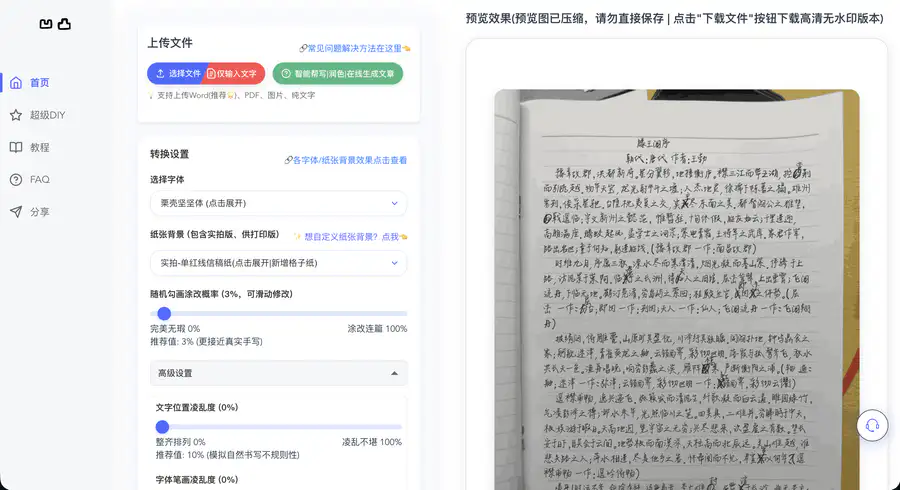
A highly faithful handwriting simulator that easily converts electronic text into handwritten manuscripts that closely resemble real human handwriting. The website supports Word, PDF, image, and plain text input. You can choose from a rich selection of hard-pen handwriting fonts, covering Chinese, English, Japanese, Korean, and Traditional Chinese multilingual options, and pair them with various paper backgrounds such as manuscript paper and A4. You can also adjust the correction probability and the messiness of text and strokes to simulate real writing, generating printable handwriting files. It is suitable for simulated notes and manuscript assignments, with one-click preview and export of high-definition handwriting results. #autohanding, #凹凸工坊, #002
- OOOAIOOOAI is a platform that aggregates AI models such as GPT, Claude, and Gemini. It provides direct access in China, works as soon as you open it, and new users can register to enjoy a limited-time free trial of the world's top models. It seamlessly connects to the native official services of ChatGPT, Claude, and Gemini, supports AI chat, intelligent Q&A, copywriting, coding, long-text summarization, and translation polishing. You can freely switch between different models and compare responses, eliminating the hassle of repeatedly switching tools. It is a one-stop direct gateway to leading overseas large models for users worldwide. #oooai #GPT
- open-web Website Traffic Analyticsopen-web is a professional and easy-to-use third-party website traffic analytics platform. Powered by real-time data dashboards, it analyzes crawler activity, tracks user behavior, and provides detailed traffic source analysis to empower SEO and improve site rankings.
- ZhimanjuZhimanju is a well-known AI-powered comic drama creation platform that enables one-stop generation from script to finished episode, helping creators produce viral comic drama content with a single click. The platform features core functions such as AI scriptwriting, comic drama asset management, and work records, while the desktop version unlocks advanced capabilities like infinite canvas, production workbench, and batch creation, fully covering the entire comic drama production pipeline. Whether individual creators or content teams, they can leverage AI comic drama production to dramatically lower the creative barrier, quickly turn ideas into complete comic drama works, and efficiently achieve mass output. As a mature online AI comic drama creation tool, Zhimanju supports diverse content creation including comic-to-drama and novel-to-drama adaptations. With AI-driven technological advantages, it has become a top choice for comic drama creators seeking to boost production efficiency.#jiaxunai
- Qiewen AcademicQiewen Academic is a professional AI research literature assistant. With intelligent search and deep retrieval capabilities, it helps you precisely locate every needed paper among massive global academic publications. The platform brings together top journals and preprints such as Nature and bioRxiv, and offers three retrieval modes: AI deep search, intelligent Agent, and inspiration discovery. It supports literature library management, project collaboration, TrueCite citation verification, and personalized trend push notifications. Whether you are searching for academic papers, tracking research frontiers, writing literature reviews, or deeply reading classic papers, Qiewen Academic helps you efficiently complete literature retrieval and academic discovery, freeing researchers from inefficient paper searches and literature lookups. It is an indispensable intelligent literature management and research assistant for academic research. #qiewenpaper
- Putian Streetwear Shoes & Apparel - SupplySix-year-old shop, first-hand supply, specializing in shoes from major streetwear brands: Nike, Adidas, Converse, Puma, Salomon, Arc'teryx, Descente, etc. Focused on mid-to-high-end quality. Also offers streetwear apparel, Apple earphones, Casio, bags, and other hot-selling items. #xie.yixuev


Details
1. Website Basic Information
Website Name: Autohanding Workshop
Website URL: https://www.autohanding.com/
Developer/Operator: Not publicly disclosed on the official website
Launch Date: 2024, still in operation
Supported Languages: Chinese interface
Network Access: Accessible in most regions worldwide
This is a handwriting simulator. Upload Word, PDF, and other documents to generate highly realistic handwritten manuscript images, helping you save time on tedious copying.
2. Pricing Model
Paid Packages: Requires purchasing an activation code. Supports uploading Word documents, selecting fonts and paper, and effect preview.
⚠️ Pricing policies may change at any time. For details, refer to the official website https://www.autohanding.com/ in real time.
3. Core Features
📄 One-Click Document-to-Handwriting Conversion
Function: Upload .doc/.docx documents and directly generate handwritten manuscript images.
Why it's worth using: No need to copy and paste line by line; an entire document can be done in tens of seconds.
🎨 Realistic Handwriting Details
Function: Adjustable correction rate (3% recommended) and text messiness (15% recommended).
Why it's worth using: Real handwriting has crossings-out and crooked characters. Once these two parameters are enabled, the mechanical feel disappears.
🖼️ Real-Photo Paper Backgrounds + Super DIY
Function: Choose from red-lined letter paper, manuscript paper, grid paper, and real-photo textured backgrounds. You can also upload a custom background PDF.
Why it's worth using: Supports selecting a specified area to write in, automatic page continuation, and can even fill in paper that already has tables.
🖨️ 600dpi HD Output
Function: A4 output is about 4960×7015 pixels, watermark-free, with multi-page files packaged as ZIP.
Why it's worth using: When printed and mixed with real handwriting, it is basically indistinguishable to the naked eye.
4. Typical Use Cases
Students → Upload a Word file of text to be copied as punishment, set the correction rate to 3%, and submit a "hand-copied" assignment in 5 minutes.
Teachers → Convert electronic lesson plans into handwritten-style handouts. Handing them out in class makes them look more like "written by the teacher."
E-commerce Store Owners → Generate handwritten-style thank-you letters in batches and put them in packages. They feel more personal than machine-printed cards.
5. How to Get Started
Open the official website https://www.autohanding.com/. It is purely web-based, no registration or login required, and works in desktop and mobile browsers.
Upload a Word file (≤1.5MB, plain text only), choose a font and paper background, and adjust the correction rate and messiness.
Click Preview first to confirm the effect, then download the HD watermark-free ZIP images and print or share them directly.
6. Comparison with Similar Platforms: Pros and Cons
Unique Advantages
No registration required; convert as soon as you open the webpage, with zero barrier to entry.
Supports Traditional Chinese/Japanese/Korean handwriting, which is rare among similar tools.
600dpi output + real-photo paper texture, maximizing print realism.
Practical Highlights
Super DIY allows uploading custom background PDFs and selecting any position for writing.
New grid paper mode: one space corresponds to one grid, making layout easier to control.
Objective Shortcomings
Under the same parameters, identical Chinese characters repeat in glyph shape. You need to manually adjust the random seed or increase messiness.
Comparison Item | Autohanding Workshop | GitHub Open-Source Handwriting Simulator | Online Handwriting Font Conversion Websites |
|---|---|---|---|
Ease of Use | Ready to use upon opening | Requires download and deployment | Ready to use upon opening |
Paper Background | Real-photo textures + custom | Relatively limited | Few templates |
Output Quality | 600dpi, watermark-free | Depends on local configuration | Often watermarked/low-resolution |
Chinese Support | Good (including Traditional Chinese) | Average | Average |
7. FAQ
Q1: What should I do if upload fails?
A: It is recommended that a single file be ≤1.5MB and contain plain text only. Word files with images or tables often fail. Convert them to plain text first before uploading.
Q2: Why is the preview image a bit blurry?
A: The preview is a compressed version at about 100dpi. The final effect is subject to the downloaded HD file. Don't be put off by the preview.
Q3: Is it normal for the downloaded file to be very large?
A: Yes. To ensure clear printing, the generated files are high-resolution originals. A4 is about 4960×7015 pixels. Remember to unzip the ZIP before printing.
Q4: What should I do if the generated characters look exactly the same?
A: Under the same parameters, the same Chinese characters have the same glyph shape. Increase the messiness or change the random seed so that each character varies slightly.
Q5: Is there a mobile app?
A: The official website clearly states that it is "web-only." Apps and mini-programs on the market are pirated. It is recommended to bookmark the official website address.
Q6: Can it simulate left-handed handwriting?
A: There is currently no dedicated left-handed mode, but adjusting the slant direction and messiness can get close.
Q7: Can it be used directly for commercial purposes?
A: The official website does not clearly state commercial licensing terms. For commercial use (such as batch printed materials), it is recommended to consult the operator through the official WeChat account first.
Based on 0 ratings
- 5 stars, 0%, 0 ratings
- 4 stars, 0%, 0 ratings
- 3 stars, 0%, 0 ratings
- 2 stars, 0%, 0 ratings
- 1 stars, 0%, 0 ratings
Rate AutoHanding Workshop?
Tap a star to rate